
Akismet does a great job in catching comment spam but it is still inserted into the database causing it to bloat over time. So I developed a small WordPress plugin that stops 99% of the comment spam (atleast for me). It uses JavaScript to dynamically add a “hidden” input field to the comments form. A visitor making a comment will also “POST” this value which will be verified before the comment is inserted into the database. No more pesky captchas or asking users to solve dumb calculations.Continue Reading…
How to customize the BuddyPress activation email

BuddyPress the social networking plugin for WordPress sends an activation email when a new user registers. This email is very plain so why not add some spice to it by having your custom email. There are many forum threads out there for this topic but 99% of them don’t mention if their method is for single site or multi site. So I spent a lot of time trying customize this activation mailer without any success. Finally I sank into the code of BuddyPress and found the right set of hooks for the each environment – single or multi site.Continue Reading…
WordPress Hooks (Actions and Filters) Search Tool

This started out as a PHP regex experiment. I wanted to find the WordPress “action” hooks in a particular theme so that I can add my own action function to it.
So instead of searching through the whole lot of files for do_actions I sat down writing a regular expression to do this. I was very satisfied with the results which made me think about creating a tool to do this.
So here you go a standalone PHP script which seeps through the PHP code of the WordPress core, plugins, themes or anything you specify and gets you a list of actions and filters.
I use the word “standalone” because this isn’t a WordPress plugin or anything which requires WordPress functions. This is a script which uses a regex in preg_match_all() to find all “tag” names in the do_action() and apply_filters() function. This does not even require WordPress, if you want to find the hooks in a plugin just download the plugin, unzip it to a directory readable by this tool.
Download WordPress Hooks Search Tool | GitHubContinue Reading…
Custom 403 and 401 error pages in WordPress
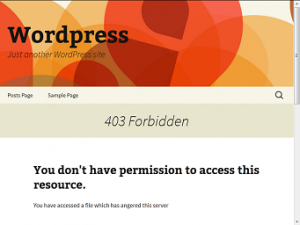
Earlier I had written an article on custom error pages for Apache but doing the same with WordPress is not that straightforward. WordPress has the ability to handle 404s internally but doing the same for other 4xx errors requires modifying the code.
I’ve been searching how to do this for months without luck. Recently after I created my own theme for this blog I got some knowledge of WordPress internals.
I put that to use and after several hours of experimenting built the 403 and 401 custom error pages for my WordPress blog.Continue Reading…
Redirecting WordPress archives to a page

WordPress started as a blogging platform but soon evolved into a Content Management System (CMS) used to create full websites. But certain features meant for a blog doesn’t suit well for websites and one among them is displaying archives. An archive in a blog contains a list of “posts” based on date, category or author, sometimes even bloggers (like me) don’t like to displaying date archives. So I decided to redirect the date archives in my blog to the home page without using any plugin and in the process also learnt redirecting category archives to other wordpress pages also. There are many ways to do this like editing the .htaccess file or using a plugin and here I’ll be editing the wordpress PHP theme files.Continue Reading…
apc.php Download
PHP APC (Alternative PHP Cache) is a framework which speeds up PHP applications by storing the result of compiled PHP programs in the memory a.k.a. caching. The apc.php file is available in the APC package if downloaded as source from the APC page of the PECL website, but if you have installed it from the Linux repository by using the command yum install php-apc or apt-get install php-apc this file will not be available. I have extracted the apc.php file from the APC source downloaded from the PECL website and it is available for download here.
Download apc.php (12KB)
Extract this file and upload it to your document root, access it from your browser and you will see a page similar to the following.Continue Reading…
- 1
- 2
- 3
- …
- 5
- Next Page »
